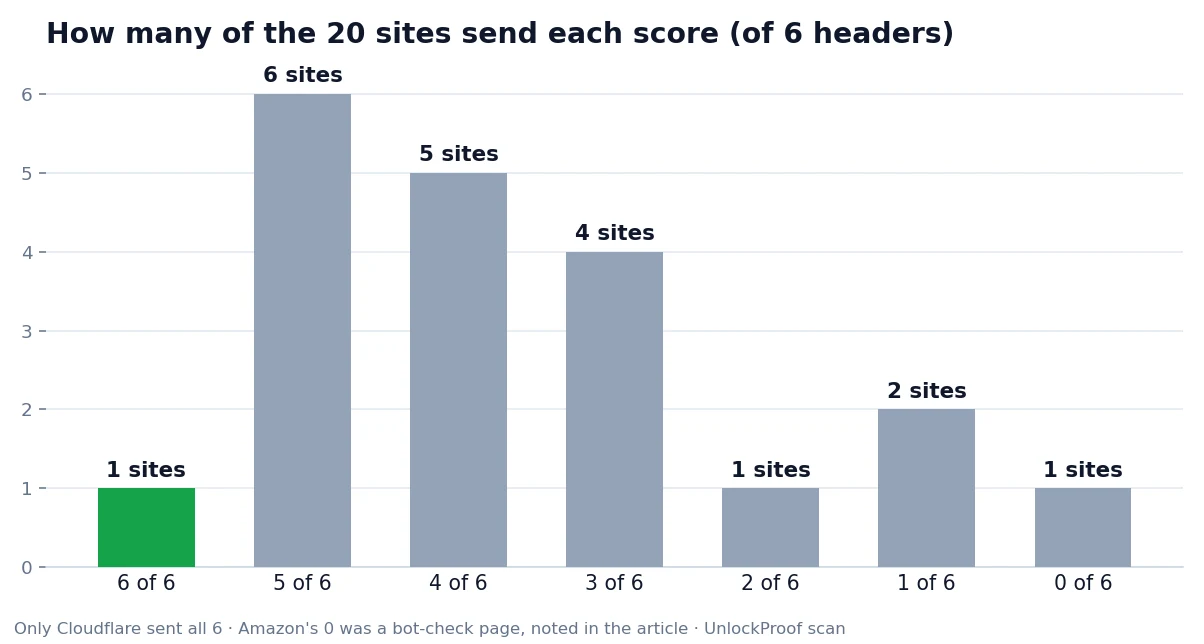
Short answer: mostly, but not completely. I checked the security headers on 20 popular websites on October 28, 2026, and only one — Cloudflare — sent all six of the headers I looked for. Seven sites sent five or more, but eight sent three or fewer, and two of the biggest names sent just one. Security headers are invisible to most visitors, but they are one of the cheapest ways a site can protect you from clickjacking, downgrade attacks, and code injection — and a surprising number of major sites still skip some of them.
What Are Security Headers?
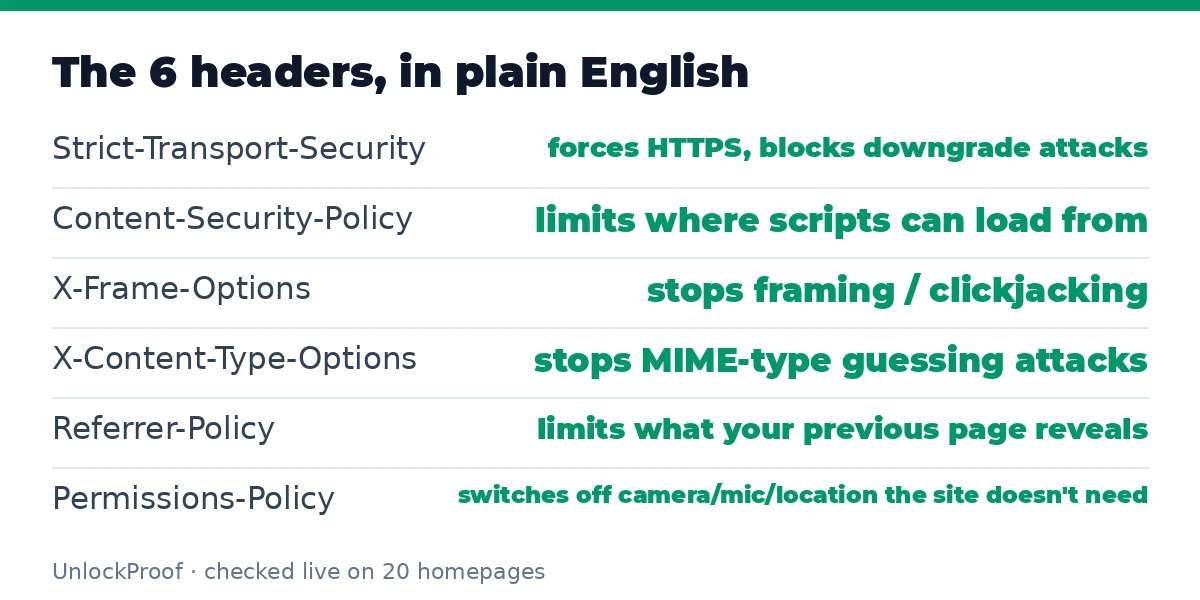
When your browser loads a website, the server sends back more than just the page: it sends HTTP response headers, and a few of them are instructions telling your browser how to behave. Think of them as the site's safety settings, enforced by your browser automatically:
| Header | What it does for you |
|---|---|
| Strict-Transport-Security (HSTS) | Forces your browser to use HTTPS only, blocking downgrade attacks |
| Content-Security-Policy (CSP) | Limits where scripts and content can load from, blunting cross-site scripting |
| X-Frame-Options | Stops other sites from embedding the page in a frame (clickjacking defence) |
| X-Content-Type-Options | Stops the browser from guessing a file's type, blocking MIME-sniffing attacks |
| Referrer-Policy | Limits what information about the page you came from is sent to other sites |
| Permissions-Policy | Switches off browser features (camera, microphone, location) the site doesn't need |
None of these requires you to install anything or change a setting. They only work if the site sends them — which is exactly why I wanted to measure who actually does.
How I Tested
I used curl 8.5.0 on an Ubuntu Linux VM to request each site's homepage over HTTPS, following redirects, with a standard browser user-agent string, and recorded which of the six headers appeared in the final response. Every site was checked the same way, minutes apart.
Two honest caveats. First, automated requests don't always see what your browser sees: Amazon returned a bot-check page (status 202) instead of its real homepage, Facebook returned a 400 error, and The New York Times returned a 403 — so their counts reflect what an automated request received, not necessarily what a logged-in browser user gets. Second, headers can vary between pages on the same site; these results are for each homepage only.
The Results: Only 1 Site Passed All 6
| Site | Headers found (of 6) |
|---|---|
| Cloudflare | 6 |
| YouTube, GitHub, X, LinkedIn, Apple, Mozilla | 5 each |
| Facebook, Reddit, Instagram, BBC, The New York Times | 4 each |
| Google, Stack Overflow, Netflix, OpenAI | 3 each |
| WordPress.org | 2 |
| Wikipedia, Microsoft | 1 each |
| Amazon | 0 (bot-check page) |
Counted header by header, the picture is clearer:
- Strict-Transport-Security: 19 of 20. Nearly universal — the one exception was Amazon's bot-check page, not its real site. Forcing HTTPS is now the norm, and that's genuinely good news.
- X-Frame-Options: 16 of 20. Clickjacking protection is widespread, and there's a nuance worth knowing: OpenAI doesn't send this header, but its Content-Security-Policy includes
frame-ancestors 'none', which does the same job in modern browsers. Counting headers strictly under-rates sites that use the newer mechanism. - Content-Security-Policy: 13 of 20. The most powerful header on the list is also one of the least adopted. CSP is fiddly to write — one wrong rule can break a site — which is probably why a third of these giants skip it.
- X-Content-Type-Options: 13 of 20. A one-line header (
nosniff) that costs nothing to add, yet seven sites don't send it. - Referrer-Policy: 6 of 20. The privacy header on the list is the second-rarest; without it, browsers may still leak full page URLs to other sites.
- Permissions-Policy: 5 of 20. The rarest of all. Most sites simply never get around to switching off camera, microphone, and location access they don't use.
The pattern is consistent: headers that protect the site itself (HSTS, framing protection) are common, while headers that protect your privacy (Referrer-Policy, Permissions-Policy) lag behind.
The Surprises
Wikipedia and Microsoft sent only HSTS. Both are enormous, well-resourced operations, yet both homepages I fetched carried no CSP, no framing protection header, and no MIME-sniffing protection. Wikipedia's case is partly understandable — a site serving user-edited content to everyone has a harder CSP problem than most — but a missing nosniff header is still a gap.
Google sent just three. Its homepage carried HSTS, X-Frame-Options, and Permissions-Policy, but no CSP, no nosniff, and no Referrer-Policy. Google's real security work happens elsewhere — its login and account pages are far more locked down than its search homepage — but the homepage is what billions of people actually load.
Cloudflare was the only perfect score. All six headers, on a homepage that still loads fast. It proves the full set is achievable without breaking a major site — which makes the gaps elsewhere look more like priorities than impossibilities.
What This Means for You
As a visitor, you can't add headers to someone else's site — but you can use this knowledge in three practical ways:
- Check sites you care about. Paste any URL into SecurityHeaders.com for a free graded report, or check it yourself from a terminal with
curl -s -I https://example.comand look for the six headers above. - Don't panic over one missing header. A missing Referrer-Policy on a site you only read is a minor issue; a missing CSP on a site where you log in and enter payment details matters more. Judge the gap against what the site holds about you.
- Keep your browser updated. Several of these protections (CSP's
frame-ancestors, Permissions-Policy) only work properly in modern browsers. An up-to-date browser is the other half of the deal.
If you run a website yourself, the lesson is simpler: HSTS, nosniff, and a Referrer-Policy take minutes to add, and a basic CSP is the single highest-value header you can add. SecurityHeaders.com grades your site for free, so checking your work is easy.
FAQ
Do security headers make a site safe on their own? No. They are one layer among many — secure code, patched servers, and strong authentication matter more. But they are a free layer, and missing them removes protection your browser is ready to enforce.
Why would a big site skip CSP? Because CSP can break things. A policy that blocks a script the site actually needs will visibly break pages, so large sites with lots of third-party content test it cautiously — often in report-only mode first, which still counts as not sending an enforcing policy.
Can I check headers without a terminal? Yes. SecurityHeaders.com grades any site in seconds, and your browser's developer tools Network tab shows the raw headers for any page you visit.
Do these headers slow a site down? No. Headers add a few hundred bytes to a response that is usually tens or hundreds of kilobytes. There is no measurable performance reason to skip them.
Is a site with fewer headers dangerous to visit? Not necessarily — but it has less defence in depth. If that site is ever hit by an injection or framing attack, the missing headers are exactly the safety nets that won't be there.
Conclusion
Twenty of the web's biggest homepages, six simple headers, and only one perfect score. The good news is that HTTPS enforcement is now nearly universal; the bad news is that the privacy headers — Referrer-Policy and Permissions-Policy — are still rare, and even giants like Google, Wikipedia, and Microsoft leave easy wins on the table. Headers alone won't make or break your safety online, but they are a visible, measurable sign of how seriously a site takes it. Next time you wonder whether a site cares about your security, don't guess — check its headers. It takes ten seconds, and now you know what to look for.
How this article was made
On October 28, 2026, I ran the header checks on an Ubuntu 24.04 VM using curl 8.5.0: one HTTPS GET request per homepage (20 sites, redirects followed, browser user-agent), recording the presence of six headers in the final response. Counts reported here come from that run: HSTS 19/20, CSP 13/20, X-Frame-Options 16/20, X-Content-Type-Options 13/20, Referrer-Policy 6/20, Permissions-Policy 5/20, all six on 1 site (Cloudflare), five or more on 7 sites, three or fewer on 8 sites. Three sites returned bot or error pages to the automated request (Amazon 202, Facebook 400, The New York Times 403) and are flagged as such rather than presented as clean results. Explanations of what each header does follow MDN's HTTP headers documentation and the OWASP Secure Headers project, and the checking tools linked (SecurityHeaders.com) were verified to return HTTP 200 on the day of writing. This article was drafted with AI assistance; every test number in it comes from the run above, and nothing was invented.